Capabilities
How it works
A single Go binary connects to your data sources, syncs everything to local SQLite, and lets you interact through Telegram or the terminal. Run it on your laptop or deploy it to a Linux server and talk to it from anywhere via Telegram. Every write action goes through approval gates before it executes.
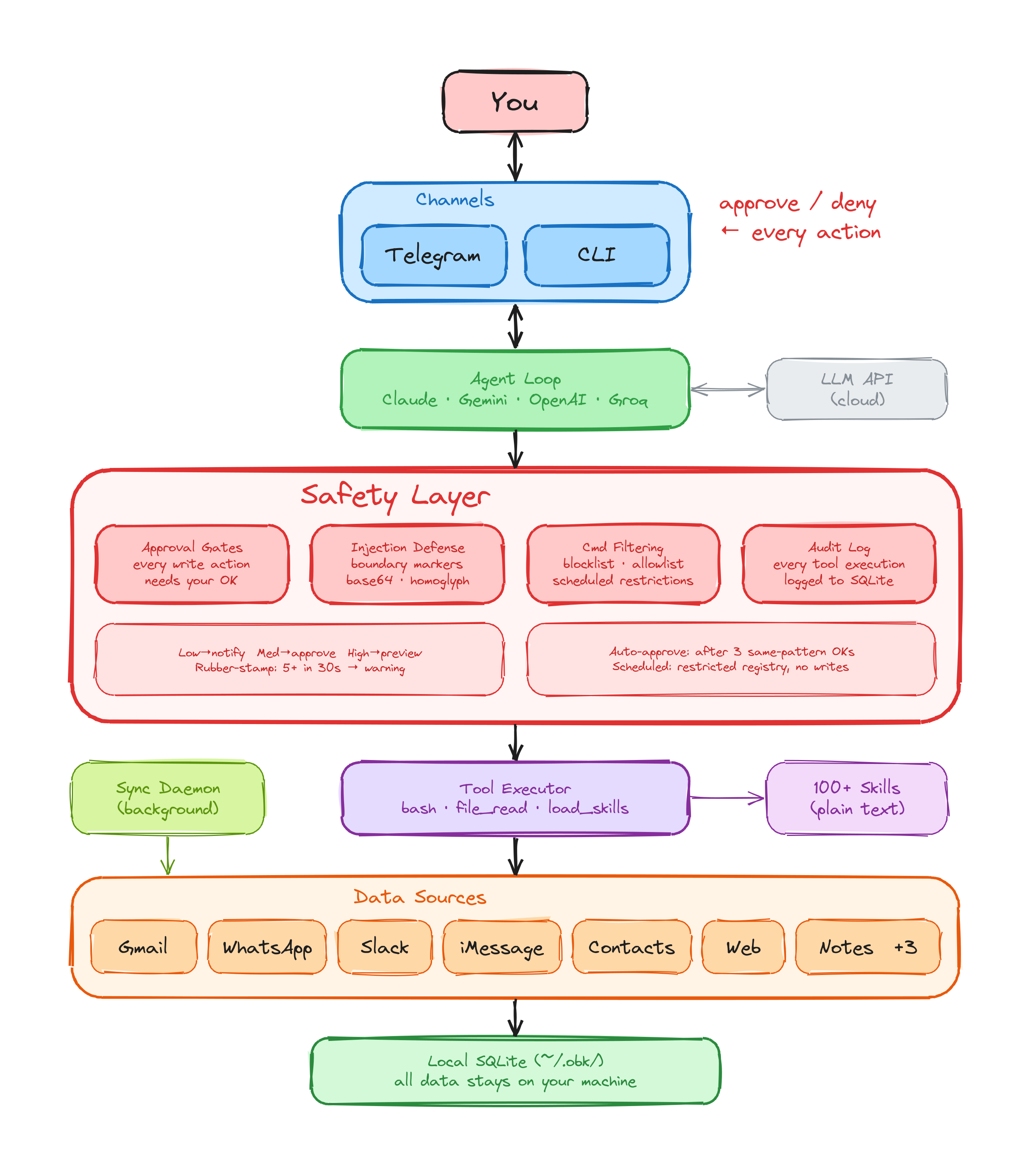
In action
Chat with your assistant on Telegram. It checks your calendar, sends WhatsApp messages, converts currencies, sets reminders, and asks before every action.
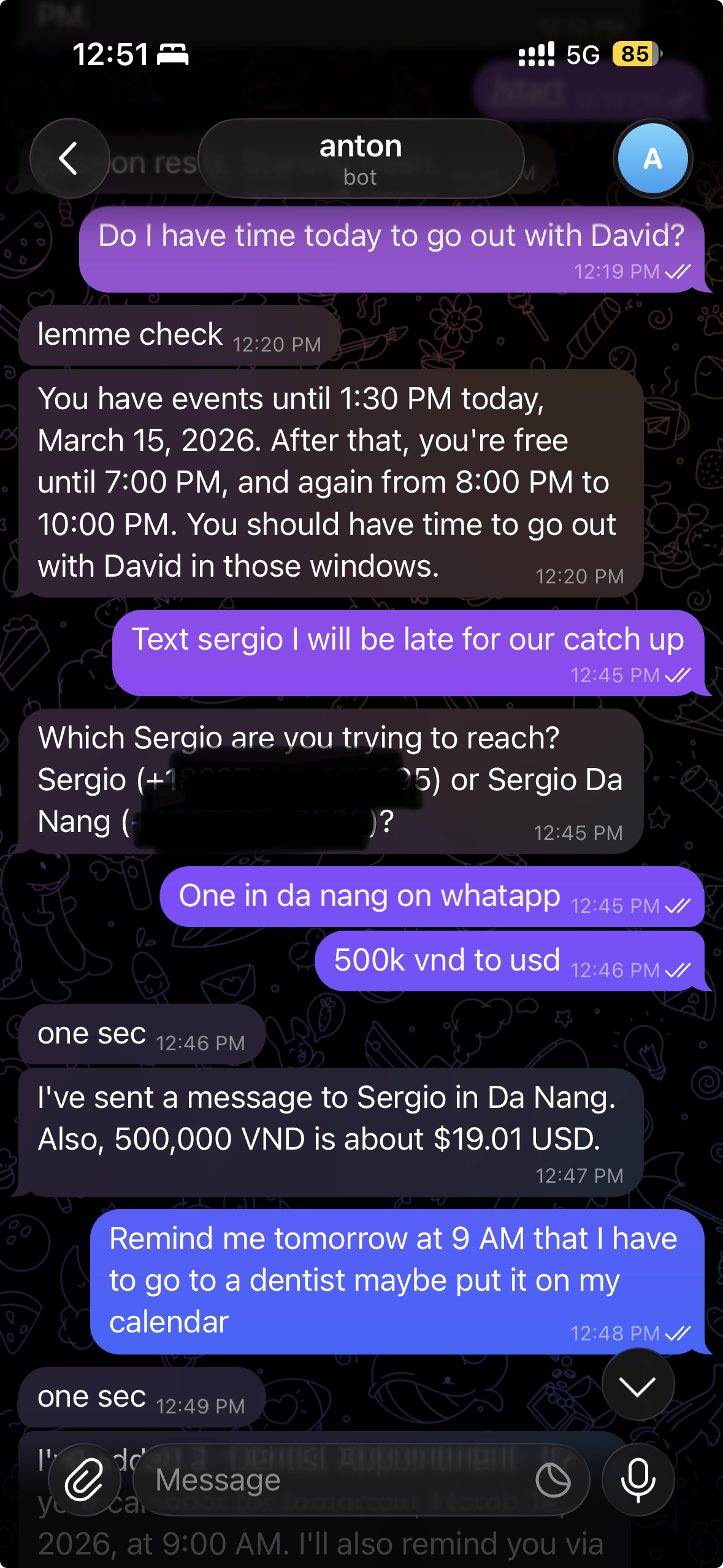
Integrations
Sources
Your assistant reads, searches, and acts across your personal data, all synced locally.
- Gmail
- : read, search, and send email with OAuth2.
- : sync messages locally via QR code pairing. Send with approval.
- Apple Notes
- : search and read notes on macOS via AppleScript.
- iMessage
- : read conversations on macOS.
- Slack
- : read channels, search messages, follow threads, react, edit, and send messages.
- Google Workspace
- : Calendar, Gmail, Docs, Sheets, Slides, Drive, Meet, Chat, Tasks, Keep, Forms, Classroom, People, Admin Reports, and Workflows. Progressive consent, 40+ workflow recipes.
- Contacts
- : search your address book by name.
- Web Search
- : 8 search engines (Brave, DuckDuckGo, Google, Bing, Yahoo, Yandex, Mojeek, Wikipedia) plus news search. No API keys needed.
- Scheduler
- : create reminders and recurring tasks.
Channels
Interact with your assistant and approve actions through:
- Telegram
- : chat, ask questions, and approve or deny actions with inline buttons.
- Terminal
- : full CLI for power users via
obk chat.
LLM Providers
Bring your own AI. Not locked into one provider.
Anthropic Claude (default), Google Gemini, OpenAI, OpenRouter, Groq, Cerebras, and Z.AI. Switch providers with a single config change. Cost profiles included so you know what each model costs before you use it.
Free tier available: Gemini + Cerebras require no API costs to get started.
The agent harness
A single Go binary. No bloated frameworks. No containers required.
- Agent loop with safety gates
- Multi-turn conversation with tool use. Every tool call goes through risk assessment and approval gates before execution.
- 105 plain-text skills
- Skills are plain language descriptions, not code. 10 personas (Executive Assistant, Project Manager, Researcher, and more), 40+ workflow recipes, and service integrations you can read, edit, or replace in seconds.
- Background sync daemon
- Runs as a launchd service on macOS or systemd on Linux. Keeps your Gmail, WhatsApp, and other sources synced in the background.
- Local SQLite storage
-
All data lives in SQLite databases under
~/.obk/. Pure Go driver, no CGO, no external dependencies. - User memory
- Your assistant remembers facts about you across conversations. Learnings are extracted automatically, stored locally as Markdown files, and you can view, search, or delete them at any time.
Safety architecture
8 independent defense layers. Not prompts. Code. Inspired by how Anthropic builds Claude Code and informed by research from Lasso Security and Trail of Bits.
- Approval gates.
Every write action (sending a message, creating an event, modifying a file) requires
your explicit OK. Enforced in code via
GuardedAction. The AI cannot bypass it. - Local-first data. Your data syncs to SQLite on your machine. No cloud relay. Nothing leaves your device unless you send it.
- Prompt injection defense. Content boundaries with XML markers, injection scanning across plain text, base64, and homoglyph encodings, and system prompt hardening.
- Tiered risk levels. Low-risk actions notify you. Medium-risk actions require approval. High-risk actions require approval with a full preview of what will happen.
- Bash command filtering.
Dangerous commands are blocked. Scheduled tasks only allow
obkandsqlite3. - Rubber-stamp detection. If you approve 5+ actions in 30 seconds, the system warns you to slow down. Approval fatigue is a real attack vector.
- Restricted unattended mode. Scheduled tasks get fewer tools, no file write access, and a restricted tool registry.
- Audit logging. Every tool execution is logged to a local SQLite database. You can review what your assistant did at any time.
Backup & restore
Your data is yours. Losing it is not acceptable. OpenBotKit includes a full backup system so your databases, config, and learnings are always recoverable.
- Cloud backends
- Back up to Cloudflare R2, any S3-compatible storage, or Google Drive. A setup wizard walks you through credentials and verification.
- CLI commands
-
obk backup now,obk backup list,obk backup restore. Automatic scheduled backups run in the background daemon.
Ready to try it?